
Translated material
What if Tor is not available?

On the evening of December 3, 2021, news rustled on sites. Tor was not available when connecting through some providers. Alarmed users began to pull each other with questions "works or does not work?"
What's happened
Information about the Tor availability problem appeared on Twitter in the morning at Valdikss. Then about this on her website reported Roskomskvoboda. It was not clear whether it was a large -scale Tor blocking, or these are some electoral “tests of the sovereign Internet”. In response to the appeal of activists, users from different cities began to report about (not) accessibility Tor. The picture turned out to be colorful. Some reported that there was no access, at least with the default settings. Others, on the contrary, claimed that everything was in order. Still others complained about the murderously slow Tor (already not unable).
The Ooni project, which monitors manifestations of censorship in different countries of the world, also noted problems with access to Tor from different providers. The Globalcheck monitoring project unequivocally announced Tor locks and promised to conduct an investigation.
By 10 o’clock in the evening, several dozen liberal, activist and technical online media had already written about the situation. The accents were placed differently depending on the degree of radicality of the authors, but in all headlines the word “blocking” sounded. Tor remained inaccessible in places, but neither Roskomnadzor nor other Russian government bodies on December 3 reported Tor blocking.
The official website of Tor was really blocked in the Russian Federation.
What is Tor and why is it needed
Tor - a distributed network of computers called nodes or gateways (on the slang "Noda"). All of them are supported by volunteers. Any Internet user can go to any site not directly, but through the Tor network. At the same time, the data will pass through three arbitrary Tor nodes and will be encrypted in the process. But the main thing: not a single knot will know at the same time the sender and recipient of the data.
The Tor network is a popular, powerful and easy to use tool to ensure anonymity . Thanks to Tor, human rights activists in countries with repressive regimes can report on human rights violations. Journalists have the opportunity to publish articles that would never approve of political censorship. People who become known the facts of corruption or other crimes are known to betray this information through Tor and do not fear for their lives. I even know about the case of using Tor by a police officer who worked undercover.
Many users mistakenly believe that Tor came up with sites to bypass sites. This is wrong. Tor, first of all, is an instrument for ensuring anonymity , which the UN since 2015 refers to human rights .
Where to download Tor
For access to the Tor network, a separate browser, which is called: Tor Browser. It exists for computers running Windows, MacOS, Linux, as well as for mobile devices on Android . IOS users can try Onion Browser .
The official website of Tor Browser is blocked in the Russian Federation. There are many sites offering to download Tor. We recommend downloading Tor only from the official website torproject.org . Why? Downloading the program from an unofficial site (and this applies not only to Tor!), You run the risk of installing an outdated version, a changed program or even a malicious code that does not related to Tor on a computer.
You can use VPN to access the Tor Browser official website . Most of our readers today already have a VPN, and if you do not have, pay attention to this article .
Why do you need the TOR bridges and where to get them
If you cannot connect to Tor directly, use intermediary nodes that are called bridges.
Some users complain about problems with bridges built directly in Tor Browser. I give further updated instructions from developers, which will allow you to get and configure the bridge manually. This can be done in three ways.
To get a bridge using Telegram Bota:
- Connect to @getbridgesbot in Telegram;
- Dial /Bridges
- Copy the bridge (the entire line is completely).
To get a bridge from the Tor Project website:
- Go to this page of Tor Project;
- Solve Kapchu;
- Copy bridges (all lines are completely).
To get an email bridge (only for Gmail and Riseup account owners):
- Send email to the address [email protected] from the Gmail or Riseup mail account;
- Leave the field of the topic empty, and in the message body write “Get Transport Obfs4”;
- Copy bridges (all lines are completely).
If these bridges do not work, seek new bridges at [email protected] .
How to use Tor bridges
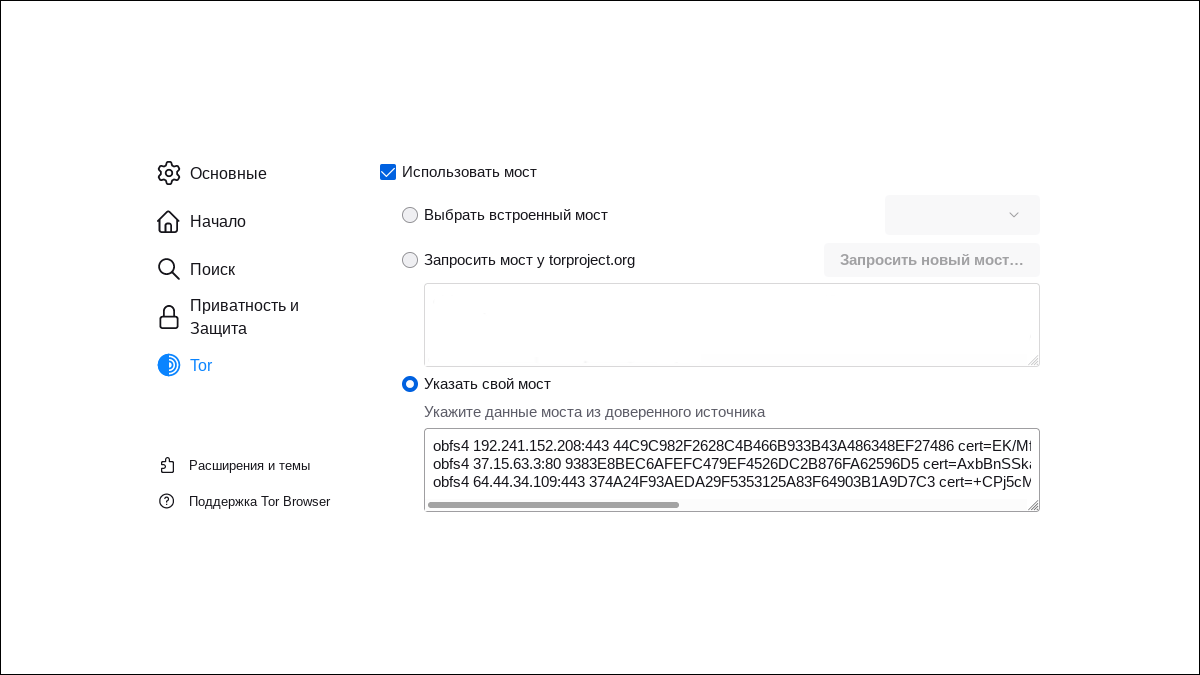
The obtained bridges must be added manually to Tor Browser. Below is an instruction for those who use Tor Browser on a computer.
When starting Tor Browser:
- Select the Tor network settings;
- Go to the section "Bridges";
- Put a checkmark in the “use bridge” field;
- Select "Indicate your bridge";
- Enter the obtained bridges (one bridge in the line);
- To preserve the changes, click "connect".
If Tor Browser is already launched:
- Go to the menu with three stripes (≡) and select “Settings”;
- Select “Tor” in the left column;
- Go to the section "Bridges";
- Put a checkmark in the “use bridge” field;
- Select "Indicate your bridge";
- Enter the obtained bridges (one bridge in the line);
- To preserve the changes, click "connect".
For Android there is an official version of Tor Browser:
- On the start screen Tor Browser, click the settings icon (gear);
- Click the "Bridge configuration";
- On the next screen, turn on the “Use the Bridge” option and select “Indicate the bridge”;
- Add bridges.
For Onion Browser (in iOS), act similarly (in the settings of the network and bridges, select Custom Bridges).