
Translated material
Introduction to Python. Part 3


Introduction to Python. Part 3
Conditions if, elif, else along with logical operators
In the third lecture of the course “Python for Journalists” we will talk about conditions: if, elif, else. And so that this lecture has practical use, we will try to solve, using conditions, the simplest problem of calculating a person’s tax and net income depending on his tax status. For this task, we will take several statuses of individuals:
individual entrepreneur (“IP1”) - pays 15% taxes on his income minus expenses;
individual entrepreneur (“IP2”) - pays 6% taxes on all his income;
self-employed (“SZ”) - also pays 6% of his income;
in other cases, individuals pay 13% of their income; In the problem we call them “FL”.
Our task will be to calculate, using the conditions if, elif, else, how much each of the tax agents will pay in taxes and what the net income will be. But before moving on to its solution, let's look at the input function, which allows you to read data from the user from the keyboard.
Input
For example, we want the user to be able to enter his own name in our program. To do this, introduce the variable name and assign it the value input(): name = input().
In the window that appears, you can enter any name. To print it, you can use the print function: print(name).
Now, to find out the tax status of a person, we will introduce another variable business_type and also assign it the value input(). Here you need to enter one of the four statuses of our task - “IP1”, “IP2”, “SZ”, or “FL”.
Now let’s enter the third and last variable, which we will read from the keyboard - income: income = input().

We will enter the person’s income into its value. And here it is important to remember that the values that we pass to input() are converted by this function into strings (type str in Python). As an experiment, try entering the number 100 in the input for the income variable. And then check the type of this object: type(income) - the type will be str. But this doesn’t suit us: we can’t perform the arithmetic operations with strings that we need to calculate taxes and net income. To convert the income type to int (which is the integer type in Python), we need to change the assignment operator slightly: income = int(input()).
If we now check the income type using type(income), we will see int, which is what we need.
if condition
If in English means "if". Accordingly, our block of code will be executed only if some condition is met. In general, the syntax of the if construct looks like this:
if condition:
do something
For simple practice, try entering a new test variable in a new Jupyter Notebook cell and assigning it some value: for example, x = 10. And in the next cell write the simplest condition:
if x == 10:
print(True)
True will be printed because the name x actually refers to object 10.
Now let's use this knowledge to calculate taxes for the first person. Let's write the following condition:
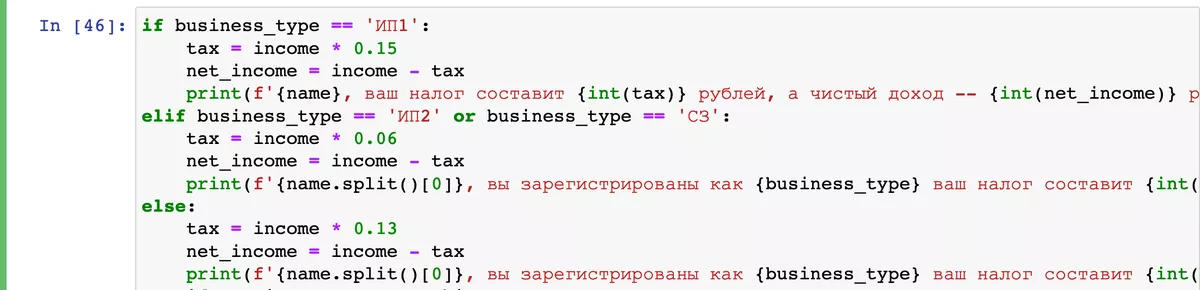
if business_type == 'IP1':
tax = income * 0.15
net_income = income - tax
In this block of code we say: “If a person is registered as individual entrepreneur1, then his tax will be equal to 15% of income (income * 0.15), and net income will be equal to total income minus the amount of taxes (net_income = income - tax).”
To check our calculations, we can print them: print(tax, net_income).

But you must admit that although our program considers everything correctly, we would like it to display something more informative for the user. Python has a very convenient way of formatting strings by using the letter f before the quotation marks that open the string. Let's use it for a more informative output of the results of our program.
Formatting strings
Let’s say we want to display the following line: “Dear NAME, your tax amount will be SO MANY rubles, and your net income will be SO MANY rubles.” To do this, let's change our print expression to the following:
print(f'{name}, your tax will be {int(tax)} rubles, and your net income will be {int(net_income)} rubles.'
The names of our variables are enclosed in curly braces.

elif condition
Elif is short for English else if, which can be translated into Russian as “even if.” elif has the same syntax as if:
elif condition:
do something
In other words, if our condition in if is not true, the interpreter then checks the condition in elif, and if it is true, then it executes the block of code under that condition.
Let's check this with the next tax agent. Let's write the following block of code:
elif business_type == 'IP2':
tax = income * 0.06
net_income = income - tax
print(f'{name}, you are registered as {business_type} your tax will be {int(tax)} rubles, and your net income will be {int(net_income)} rubles.').

Now go back to the beginning of the notebook and set new values in the input function for the variables name, business_type (here you need to enter IP2) and income. The program should calculate the values for “IP2” and display them on the screen.
Conditions and logical operators
Now we need to calculate the values for the self-employed (“SE”). Their tax rate is the same as IP2. And the natural desire would be to copy the entire block of code that relates to “IP2” and substitute it under “SZ”. But this is bad practice. It is better to use a logical operator in this case. In our case, this is the or operator, which is translated into Russian as “or”:
elif business_type == 'IP2' or business_type == 'NW':
tax = income * 0.06
net_income = income - tax
print(f'{name}, you are registered as {business_type} your tax will be {int(tax)} rubles, and your net income will be {int(net_income)} rubles.')
In this block of code, we seem to be saying: “If the type is “IP2” or the type is “NW”, do something.”
else condition
The else condition (which is translated into Russian as “otherwise”) is satisfied if all the conditions above have not been met. Therefore, its general syntax looks like this:
else:
do something
Please note that the condition itself in the else construct is not specified, unlike if and elif. Which is logical, because the block of code after it will only be executed if all the conditions above are not met.
Therefore, to calculate the tax and net income for a person working in an organization, we just need to write:
else:
tax = income * 0.13
net_income = income - tax
print(f'{name}, you are registered as {business_type} your tax will be {int(tax)} rubles, and your net income will be {int(net_income)} rubles.')
