
Translated material
Introduction to Python. Part 6. Dictionaries


Introduction to Python. Part 6. Dictionaries
Dictionaries (dict) and their methods
Let's talk about dictionaries. Not those, of course, that were compiled by Dahl or Ozhegov, but about dictionaries in Python. A dictionary in Python is an unordered collection of elements. Let's use an example to understand what it is and how it works.
You can create an empty dictionary using curly braces. Or using the dict() function.

But let's populate our dictionary with data and see how it works. Here, for example, is a dictionary that stores data on the three public officials with the highest declared income. The official's name is the key and income is the value.

And we can access dictionaries in Python precisely by key. First we indicate the dictionary, then the key in square brackets. The value will be returned.

Through the key, you can add new elements to the dictionary. Let's add Vladimir Putin and his declared income for 2019. And we’ll immediately check whether it has been added to the dictionary.

It’s just important to understand that there is a significant difference between the lists and dictionaries you already know. Lists are an ordered collection of data, while dictionaries are an unordered collection. Therefore, elements in a dictionary do not have an index. You can’t look up Vladimir Putin’s score and use that number to contact him. Such an attempt will end in error.

This error means that the dictionary does not have a key such as 3 , the number we tried to use as the index of the element. You can access dictionaries only by key. Therefore, if the value you specify in square brackets is not in the dictionary, you will receive the same error. But there is another way you can get values from a dictionary without worrying about errors. This is the .get() method.
Do you like our lectures? Support us! Your donation will help us prepare even more episodes of the WorkshopSupport “Important Stories”In parentheses you indicate the key whose value you want to get, and separated by commas you indicate what you want to get if such a key is not in the dictionary. In the example, we will receive the string “no key” in response. If you do not specify anything separated by commas, then None will be returned by default.

In dictionaries, keys and values can be different data types. For example, both can be numbers. Only if your key is a number, then you need to indicate it in square brackets when accessing as a number. If you put it in quotes, it will have a different meaning. You will again receive an error that such a key is not in the dictionary.

Values in a dictionary can also be lists. Let's now add an element to the dictionary, the key of which will again be Vladimir Putin, and the value will be his declared income for the last three years in the form of a list.

Please note that the entry with Vladimir Putin, where there was income only for 2019, has disappeared, only the last entry we added with income for the last three years remains. The fact is that in a dictionary there cannot be two elements with the same key. If you add an element with a key that is already in the dictionary, it will simply be overwritten.
Subscribe to the Workshop newsletter You will learn about cool tools for collecting, analyzing and visualizing dataYou can remove an element from a dictionary using .pop() . The element key must be specified in parentheses. It will be deleted and the deleted value will be returned to you. Let's try to remove Vladimir Putin from the dictionary at least.
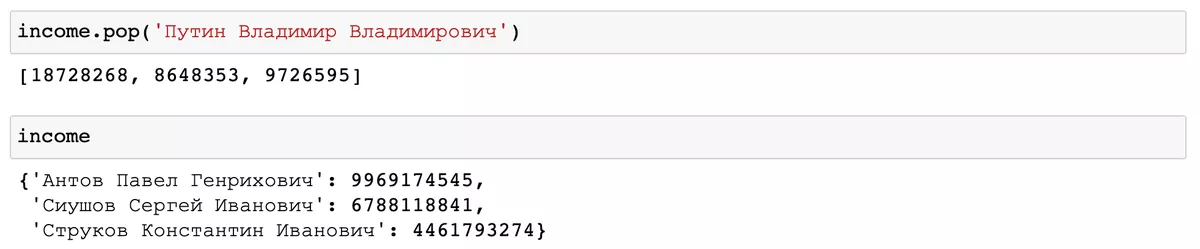
Another good thing about dictionaries is that we can get a separate list of all keys and all values. For the first we will use the .keys() method, and for the second - .values() .

Let's create a new dictionary in which we will store the income for the last three years of Vladimir Putin and Dmitry Medvedev. And we’ll write a small code that will sort through the elements of this dictionary and print us a message about who had the minimum income over the last three years. And to solve this problem we need one more dictionary method .items(). If the .keys() method allowed us to get a list of all keys, we could iterate through this list, and .values() works in a similar way, then .items() allows us to iterate through both the key and the value in pairs.

All we have to do is go through the keys and values, determine the minimum income and display a message on the screen. To do this, we use the min() function, which will return the minimum value from the list and print().

These are the main dictionary methods that are most often used in work. You can see even more dictionary methods here . And the link to the Jupyter Notebook is, as always, on our GitHub here .
Support thosewho is telling the truth! You can become our donor by making a one-time or monthly donation. We want to depend only on you - those who want to know the truth, those who are not afraid to be free. Help us tell you the Stories That Matter.Support Important Stories