
Translated material
I'm learning to program on Python: Installation
In the new issue of the blog about programming, I go to where, perhaps, I should start - what tools are needed to write code on Python and how to use them.
Previous issue
I'm learning to program
On Python: Classes and Objects
We started writing the game, but I completely forgot to talk about the tools for working with Python, which I was asked about a few weeks ago. Last time, we introduced the concept of classes, and usually a separate file is used to describe each class - and therefore we will no longer be able to limit ourselves to one large piece of code. Our game LAM-40 will have the main script that will turn to other scripts describing the classes using the IMPORT keyword. One of the scripts will be created by us last time Bureaucrat.py. Before we continue to expand the description of this class, let's create on the computer a simple ecosystem for working with Python.
To begin with, go to the Downloads section on the official website of Python, download the last version of the language interpreter there - now it is 3.4.3 - and install it. On Mac OS X, everything will be in general, and on Windows you need to check that all components, including Add Python.exe to Path, are included at the Customize stage. After installation on Windows, you will also need a reboot. Please note that in the Mac OS X Python it is included by default - but the second, not the third branch. To enter the shell of the interpreter of the third version of the language, you need to enter and run the Python3 command in Terminal, it should be scored in Windows on the command line simply Python.
When you first go into the interpreter shell, I advise you to definitely view the most famous Python Easter egg - The Zen of Python, written by the famous enthusiast of the language Tim Peters. To do this, run the Import this command in the shell, and you can get acquainted with the main theses of Python's philosophy - in other words, how to use it better. Here is a translation into Russian:
Beautiful is better than ugly.
A clear better than implicit.
Simple is better than complex.
Complex is better than confusing.
Flat is better than invested.
Stead is better than dense.
Readability is important.
Special cases are not so special as to violate the rules.
Although practicality is more important than impeccability.
Mistakes should never be silent.
If they do not be silent clearly.
Having met ambiguity, discard the temptation to guess.
There must be one - and, preferably, only one is an obvious way to do it.
Although at first he may not be obvious if you are not a Dutchman.
Now better than never.
Although it is often better than right now.
If the implementation is difficult to explain, then the idea is bad.
If the implementation is easily explained, then the idea may be good.
The spaces of names are a great thing. Let's make them more!
For those who will not be enough, I advise you to introduce the IMPORT ANTIGRAVITY command and see where you will get. So you can make sure that Python has one of the best enthusiast communities.
The next step is to work with PIP, a tool that sets third -party Python libraries. It should be available along with the latest version of Python. To use PIP, type commands from the terminal or command line (attention! - not from the Python shell) . Perhaps your version of PIP will be outdated, and therefore update it by introducing the PIP Install -Upgrade Pip command. You can install packages by the PIP Install command, after which the name of the installed library should follow through the gap - it can be viewed in the database . If you do not have the necessary privileges, you may need a keyword SUDO or team --user. To delete libraries, the PIP Uninstall command is used to list all the established libraries - PIP List. To see the tips which commands can be used, dial PIP -H or just PIP.
The code on Python can be written in any text editor - the main thing is to save the script with the expansion of .py. However, it is much more convenient to program in a specialized application-I use Sublime Text for this, but nothing prevents you from choosing something else to taste and capabilities. Sublime Text is good for a convenient interface, as well as the fact that it expands great and on the move supports the main programming languages. This is what the class we wrote in it look like in it: the last time:
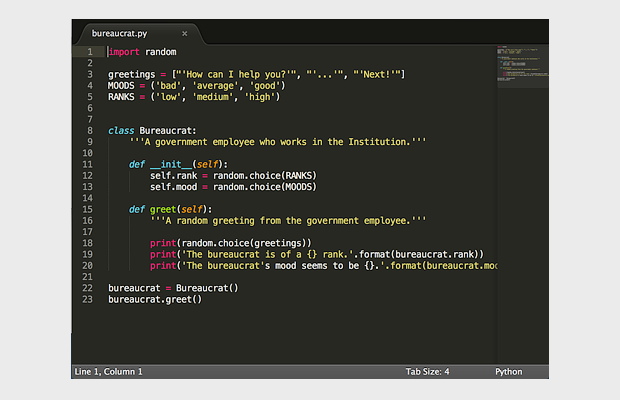
On this, in general, all-we are ready to start work. To launch the script, the Python3 or Python command needs to be entered in the terminal or command line, and after the gap is the name of the script with the extension after it.
Now we have all the tools necessary for work. Next time we will continue to write a game for which we took up the previous release of the blog. If something is not clear to you, write comments under the material and on social networks-I will be glad of any other reviews. If you are a more experienced person in programming than I, then I will be happy to listen to substantial criticism. Thank you, and until the next time!
See also:
Full Python courses on Codeacademy and Treehouse *
* - paid courses, but there is a trial period
Development of programming thinking on udacy
Official site Python
Official Sublime Text website