
Translated material
New Facebook design - how to optimize your page?

Currently, Facebook is in the process of making various changes and improvements regarding the appearance of the pages. We collected all changes in our article and prepared tips that will help you optimize your page on this social network.
What has changed?
New design:
So what changes have occurred?
- All records and updates are now in the same column;
- The left column contains complete information about your page;
- Buttons with which you can subscribe to the page are on Cover Photo (cover);
- You can access the page control panel through the upper or side menu;
- New tools for analytics have appeared;
- Applications are now in the left column;
- “Notes” returned;
- The pages that you were bent are below.
Please note that the changes in design have not touched the mobile version of the site-it still looks.
How can a new design change how you control a page?
In the old design, one and two columns alternated in such a way that your page updates were more like a mosaic. In the new design, the page looks more standard and resembles the traditional design of blogs.
In this case, it will be appropriate to relate to the Facebook page as a blog - always follow what is at the very top of the page, because This gives the impression of the page and its content as a whole.
One way to solve this is to “pin” some post (your best or relevant material), so that it is always at the very top and your visitors see it first.
This is easy to do by choosing PIN to top/highlight on top in the upper right corner of the desired entry on your Facebook page.
Where to find analytics?
If you choose in the Insights control panel/statistics, you can see full statistics, including the audience coverage and the popularity of your records.
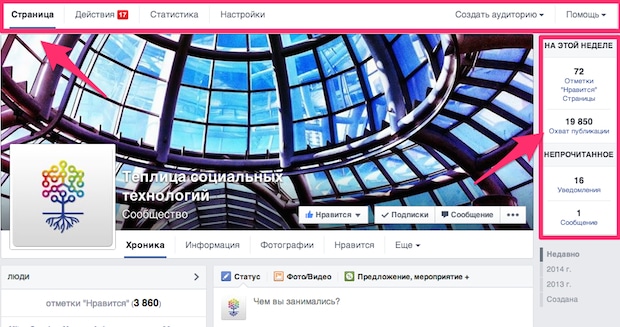
If you choose in the Insights control panel, you can see full statistics, including the audience coverage and the popularity of your records.
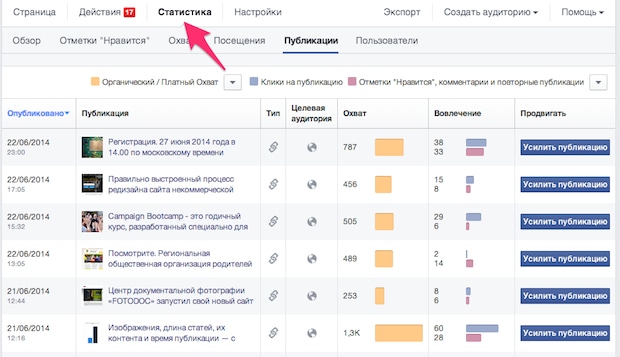
The blue strip displays the number of clicks that each record received, and red - interaction with the record (all likes, comments and shara).
Thus, you can choose your most popular record and place it on the top of it.
What do users see first?
Cover (Cover Photo) - was one of the most important elements of the page since its appearance. This is exactly what people who enter your page see first of all.
With a change in the design, the cover has not lost its importance, but it has become how loaded with other elements - the page name, its description, some buttons and the picture of the profile are now (and partially close) the cover.
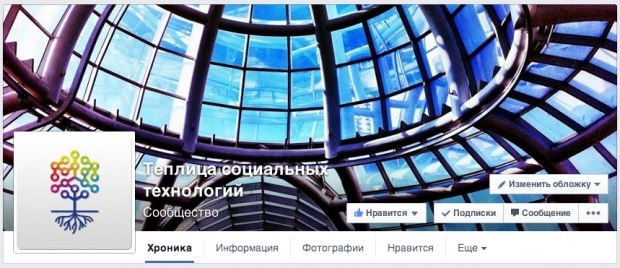
Therefore, now it will be necessary to carefully choose the image for the cover - so that the buttons do not close its important parts. Use the image-gayd that shows in pixels, which areas will be affected by additional elements.
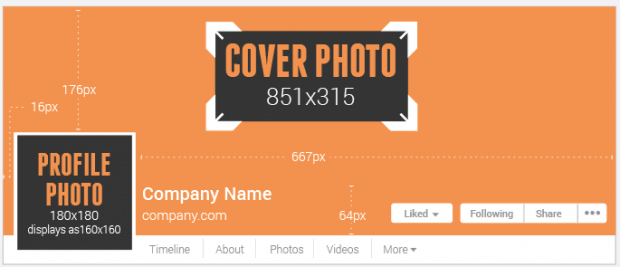
The hierarchy of the left column
Now all the information about your page is in the left column in the following sequence:
- Likes and Visits (likes and visitors);
- Information ABOUT YOUR Company (information about your organization);
- Link (link);
- Option for Others to Suggest Changes.
- Apps (applications);
- Photos (photos);
- Videos (video);
- Reviews (reviews);
- Posts to Page.
- Liked by this page.
Also, if you indicate this information, a map with the address of your organization, telephone and time of work will be shown in the left column (therefore, do not indicate this information if you do not want your visitors to see it).
What does this hierarchy mean? The fact that now you should carefully choose which information to indicate, and keep in mind in what sequence your visitors will see it. However, soon Facebook can add the opportunity to choose the procedure for displaying points in the left menu.
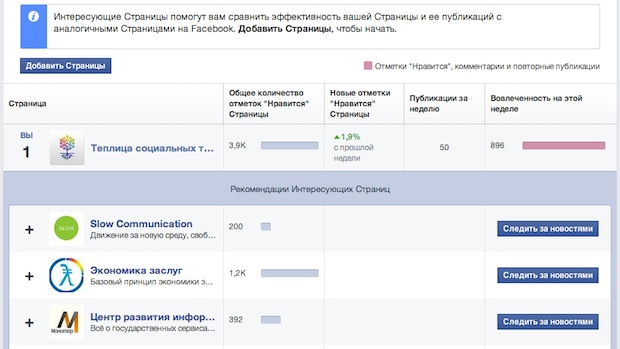
You can choose close to you on the subject of the page and monitor their successes is to add a competitive aspect to your page.
The material was prepared on the basis of the materials and experience of the portal TE-ST.org , Buffer , John Loomer, SocialMediaexaminer.com