Translated material
42 Safety Security Councils
The safety of mobile devices and, in particular, smartphones is an inexhaustible topic. Android and iOS form two worlds. The Android community is full of different versions of this operating system. Some developers came up with their own shells in which logic and convenience do not always occupy honorary places. Another feature of smartphones compared to computers is the relative simplicity of changes, settings, and installation of applications.
As a result, two smartphones of one year of release can be similar as zebra to a crocodile. Nevertheless, the greenhouse dared to reduce some recommendations in a generalizing list.
This list cannot be considered universal. Certain points can have different “weight” in your model of threats. We do not claim to be full. None of the listed points is a magic button that can turn a smartphone into a super -defended bunker or paralyze an attacker. This is only the advice "how to increase safety a little." Sometimes to win the time to take more decisive and effective measures.
1. Preparation
Think about what the most valuable information is stored on your smartphone. What would you like to protect? Focus on this data. Do not postpone the solution of the issue of security at the last moment. If some “authorized persons” come to you on the street and politely ask your smartphone “to watch”, it will be too late to take some urgent measures. You better be prepared for such a situation in advance.
2. Cleaning and cleaning
Clean the address book, the history of calls and SMS, contacts, emails, messages in messengers, notes, the history of views in browsers. Reduce the amount of information that can potentially get to the eye of an outsider. Transfer from a smartphone to a reliable place of photos and videos. Let them “in which case” remain with you. If you go to the most risk zone (where, as you know, your phone can be selected and viewed), think about (temporarily) to get rid of applications containing confidential information. For example, clean the address book. Or remove the messenger with the working correspondence and leave only the one where you are traditionally conducting household conversations.
3. Backup
Create a backup copy of the remaining data. This can be done with synchronization means, special programs or manually.
Perhaps it is better to store data not on the device at all, but, for example, in the cloud. Even better, of course, if you encrypt files before sending to the cloud. So you will avoid situations when, together with a broken (lost, stolen, seized during a search or just on the street), you will lose valuable data with a smartphone.
4. Fast removal of the application
With a security incident, you may have very little time to respond. Perhaps you will have time to remove any important application with a delicate correspondence. It is really easy to make a pair of fingers - but you should know how, so as not to spend precious seconds. We advise you to figure it out and practice.
5. Cryption
The encryption will become on the path of an attacker if he decides to get to the contents of the smartphone. But if you have a relatively old version of Android, the device may not be encrypted by default. Check this in the settings. In more recent versions of Android (they began to do this, starting with the 7th version, and completely moved to the 9th) full-disc encryption (FDE) was replaced by encryption of files (FBE), more details can be read here . The iPhones are encrypted by default.
6. Password protection
Turn on the lock screen. Typically, security experts advise using a reliable password, and not a simple pin code or fingerprint (or face scan). A combination of four digits can be selected, and you can make you a finger (or use your helpless/unconscious state) to the scanner. However, all the time to use a complex password can be uncomfortable. In this case, we advise you to weigh the risks. If you go to where the risks are higher, think about changing the mark on a reliable password.
7. Fast blocking
Set the system so that the screen lock is activated not after half an hour, but after a minute or two inaction. If the phone is in the wrong hands, the attacker will have less chance of getting to your data.
8. Passwords for applications
Some shells (for example, Miui from Xiaomi ) allow “to pack up” individual applications. Another barrier on the path of an attacker. And other applications contain their own, built -in password protection. By the way, do not forget about passwords as two -factor authentication for instant messengers.
9. Pin code on the SIM card
This is only old -fashioned at first glance. A situation is possible when an attacker will take possession of a smartphone, take out a SIM card from it and inserts into another apparatus. Then he will be able to “restore forgotten passwords” to those your accounts where there is such a function and binding to a mobile number. The PIN code makes this task not so simple.
10. Binding of the number
Without the need, do not tie your phone number to accounts (for example, mail, cloud storage, etc.). Even if the owner of the service claims that it is useful in terms of security (to restore the forgotten password). Binding a mobile number - potential vulnerability. It is better to invest in reliable storage of passwords and backup.
11. Renaming applications
In some membranes, you can rename the application and change the icon for it. This will not hide the application completely, but will not attract the attention of the attacker with a cursory examination of the smartphone. Google whether there is such a function in your device.
12. Second user
There are also smartphones where you can create a second working space or even a second user - so that if you enter one password at the entrance, one working environment opens, the other password - the other. This may be useful if you are forced to unlock the device. But even if your smartphone does not have such a function, think about a high -risk situation that, for example, to change the Google account. (I believe that almost all android users and many iPhone users have it). To do this, you must have a spare Google account in advance. Such a step will protect, for example, your mail from viewing. After all, if the attacker has access to the device, you can go into the Gmail box with one click.
13. Double -factor authentication
Use the application on the smartphone as a second factor in two -factor authentication. This is better than two -factor authentication by SMS. And do not forget about reserve codes (sometimes they are called recovery codes). These codes, of course, should not be stored on a smartphone or at risk (for example, where they can be removed during a search). Codes will be needed if the device is outside your access.
14. Cleaning applications
Remove applications that you no longer use, or which you once downloaded “try” and “just in case”. Less surprises, more free space. Install only those applications that are really needed.
15. Applications permission
Control applications. If the Funding application requires access to the network, the address book and GPS coordinates, find the flashlight more modest. Do not let him carry your data to solve someone's marketing problems or other espionage activities. For established permission applications, you can also control (and disable).
16. Updating the operating system and applications
Until recently, "security guards" unequivocally advised to include automatic update. But in 2022 a new risk appeared: some manufacturers of devices and software began to refuse users in support for political reasons (for example, to customers from Russia and Belarus). These corporate restrictions are almost impossible to predict. But they can be monitored if you listen to the warnings of the owners of the services and the voice of the user community. Before updating something, it may make sense to look for fresh data on the network: is this an update safe? Will it lead to the inoperability of the device?
17. Trusted sources
Android has an option that allows the installation of applications from other sources, in addition to Google Play, for example, from .APK files. If you do not have this need, forbid other sources except Google Play.
18. Google Protection
Android has built -in protection against harmful code - Google Protection. By default, it is turned on. Make sure that it is.
19. Safe messenger
Use for communication a relatively safe messenger with through encryption (at least signal), not SMS, ordinary voice calls or unprotected email. Do not forget to include messages by the timer in the messenger before any conversations (in Signal it turns on automatically for 1 week, but you can always change this parameter).
20. Tor
Use Tor Browser (in iOS - Onion Browser) to ensure anonymity when necessary.
21. VPN
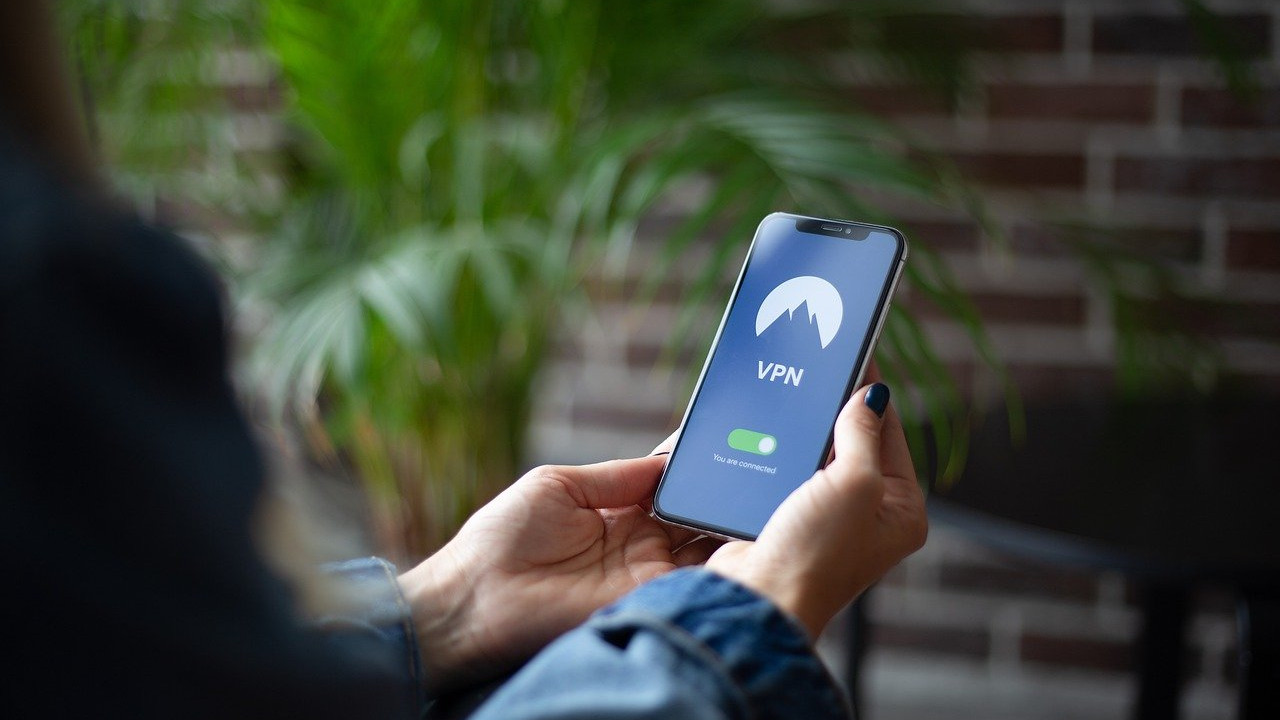
Use VPN to protect confidentiality, especially when connecting WiFi to other people's networks.
22. Caution with connection to WiFi
Do not connect to the dubious free open WiFi networks, whose accessories you are not sure. If you arrived, for example, to the seminar, and your device recognized a non -parallel network with the name "Seminar_free", do not rush to connect. First, ask the organizers of the event with the name of the network and password.
23. Disconnect wifi
Do not hold the WiFi option constantly turned on. At least for reasons of energy saving and preventing automatic connection to “familiar” networks.
24. Wifi history cleaning
The smartphone can “remember” your WiFi connection. This is convenient: coming to the familiar cafe, you do not need to remember the password. But if the device falls into the hands of an attacker, he will be able to get another confirmation of your movements. Perhaps it is better to remove at least those places where you are not going to return from history. (In the end, even if you return, you can ask the password again).
25. The name is wifi
If you distribute your own WiFi network from a smartphone, it may be better not to use identifying data in the name of the network. (Family name first of all).
26. The name of the device
The same advice concerns the name of the device itself.
27. Wifi protection
If you distribute WiFi, do not neglect password protection. Turn on WPA2-PSK with a reliable password.
28. Notifications on the lock screen
Disconnect the output of the content of the messages on the lock screen. Otherwise, even if the smartphone just lies on the table and is blocked, anyone who passes by sees part of your correspondence. And if the device falls into the wrong hands ...
29. GPS navigation
Make an application for navigation with offline cards on a smartphone. This will help with orientation on the ground in many situations (as well as increase the feeling of control and safety). Do not believe the stories from second -rate films, where the characters are “tracking GPS”. The GPS chip itself in your device does not convey anything to anyone. This is in its pure form a signal receiver from satellites. Any application that you (possibly) is “perhaps) is“ responsible ”for the transmission of data on the smartphone. This application has permits to access the data of geolocation and the Internet. This is how your movements with great accuracy can become famous strangers. Do not scare GPS; Make sure that there is no espionage software on your device.
30. Search for the device
The geolocation function, in particular, can be useful for finding a lost device.
31. Developer mode
Android has the so -called “developer mode”. It expands the possibilities of managing the device, but also makes it more vulnerable. If this mode is visible in your settings, but you do not need it, it is better to turn it off.
32. Ruth and Jailbreak
Superpers allow you to seek many useful and cool pieces from the smartphone, but also increase risks ( Root for Android, Jailbreak for iOS). If there is no urgent need, and if you are not sure what you are doing, do not counter the device.
33. Do not leave the smartphone unattended
Do not leave the device outside your control. Even not for long. Do not put him next to you on a bench to turn away and delve into the bag. Do not lay out the smartphone on the table, passing through the frames at the airport, at the station or in a different place where the frames are installed. There is a risk of theft and physical damage. It is better to put the smartphone in a bag and transfer for automatic or manual inspection. If there are no bags with you, put the smartphone in a jacket, remove it and give it out for inspection.
34. Do not give the smartphone to others
If possible, do not transfer the smartphone to other people. Call someone, go online, etc. If you want to help a person in a difficult situation - make the right action yourself, with your own hands.
35. Follow the category
Do not allow the smartphone to go into a deep discharge. It can be harmful to the battery. If you do not use the device for a very long time, at least sometimes recharge it.
36. Pauerbank
Going somewhere for several hours or longer, grab the charger (PowerBank). Powerbank is absolutely needed in risk situations. If, for example, you will be detained, then the phone will not be immediately taken away; But if you are discharged with you, you are unlikely to count on charging and socket in the police department. And do not count on free charges in public places. There may not be the right current or not to be current at all. And if he is, you will have to close with other people near the rack with USB ports, it is unsafe by itself.
37. Czech and glass
Physically protect the smartphone from strokes: buy a decent cover and stick a protective glass (at least a film).
38. Aviation power
Use the “Airplane” mode when you need to “disappear from the radars” (theater, meeting, webinar; or if you believe that someone is tracking your movements; or just want to sit in silence on the river bank, observing the flow). Please do not forget to turn off this mode upon returning from the astral.
39. Storage for little things
If from time to time you change the SIM-cards and Microsd cards in a smartphone (often this happens on the go), come up with some place of reliable storage for temporarily not used cards. It can be a separation in a wallet or a pocket with lightning, or some separate container.
40. Trust
In some risk situations, a reliable person with access to your accounts may be useful to you. The proxy will help out, for example, if the phone is seized or stolen, and you yourself will not be able to urgently change passwords and tie a new device for two -factor authentication.
41. Field phone
Sometimes it is better to take with you not the main, but a replacement device, the so -called “field phone” . An ordinary simple smartphone that is not so sorry to lose. Sometimes it’s better not to take a phone with you at all.
42. Source of stress
Finally, a smartphone as a constant source of information can increase stress. It is useful to give yourself a rest from every minute communication with an electronic companion.
The author thanks the security consultants Daniil Lipin and Mikhail Ivanovsky for their help in preparing this material.
Additional materials
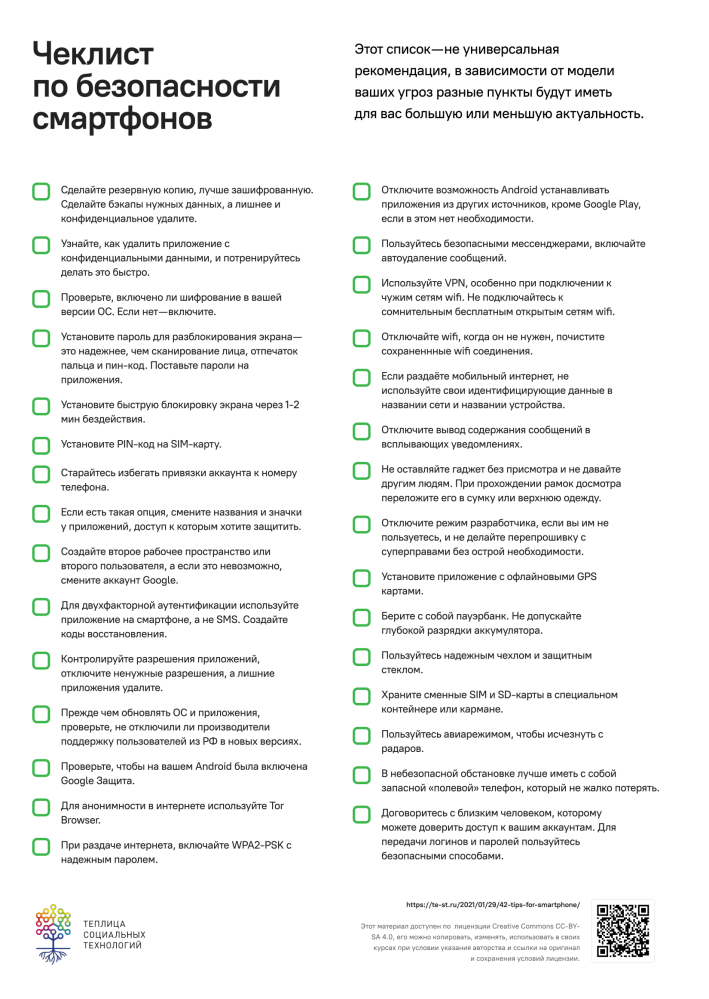
The Cheklist will help you systematize everything that we talked about above. You can download it, print it, mark it in it, or delete the irrelevant. Good luck!