
Translated material
Telegram API: what you can use it to find out about you
Given: user xxx0006 left a comment in which an employee of Center “E” found a justification for terrorism or some other sedition. How can a security officer find the author of this comment? A tool with three letters can help him with this: API. In the memo we tell you what it is.
1
What is an API and why is it needed?
API (Application Programming Interface) is a software interface that works as a “bridge” between applications. It simplifies the interaction of services, applications and bots with each other.
When you order food in a restaurant, you tell the waiter what you want, and the waiter passes the information on to the chefs. In this example, the API is the waiter, your order is a special code, and the chef is the application that should process the “order” (for example, Telegram).
2
What can you find out using the Telegram API?
- username, username;
- phone number (if it is not hidden in the settings);
- profile photo (if it is not hidden in the settings);
- status (“was recently”), depending on the settings;
- profile description (bio);
- date of birth, depending on settings;
- profile background color;
- stories, if they are open;
- your account type (premium, business);
- what general chats you have with the person making the API request.
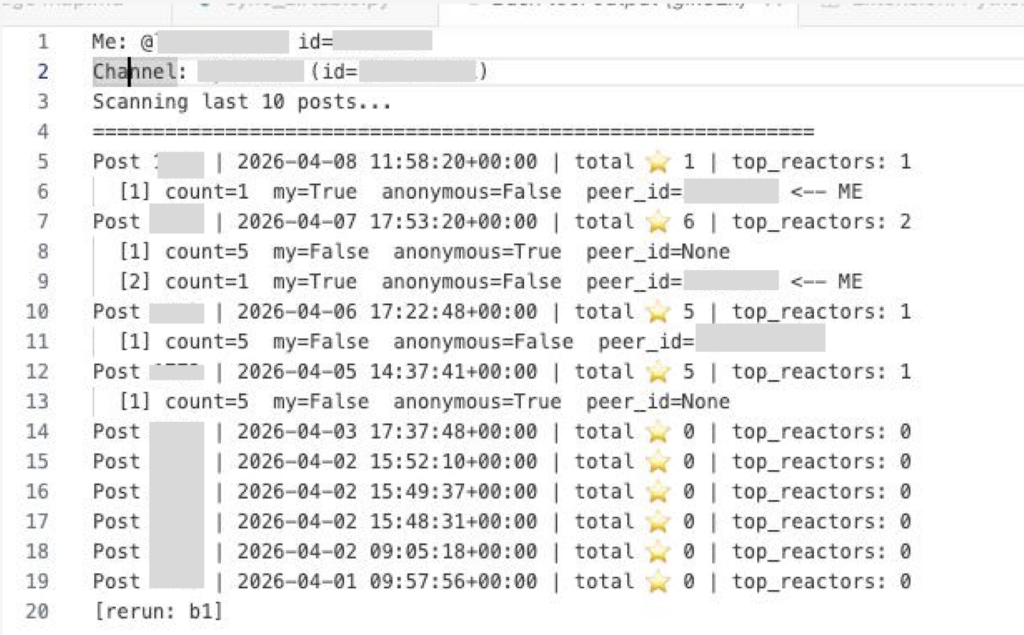
You can also use the API to find out who left paid reactions in a specific channel (if they were not sent anonymously). Here's an example of what the API output looks like.
3
What exactly can't be learned using the API?
- a list of your contacts;
- your personal correspondence;
- subscription history;
- geolocation (unless you have enabled geolocation broadcasting in the settings; this feature is disabled by default).
4
I am in a general chat with an “eshnik”. What can he find out about me using the API?
If you are in a general chat with a Center “E” employee, he can find out the following about you:
- user_id, first_name, last_name, username / usernames, photo, personal_photo, profile_photo (if your privacy settings allow it);
- status — last seen or the exact time of the last appearance on the network (if you did not hide it in the settings);
- Is it possible to call you via audio or video;
- bio/about - text about you from your profile, if it is not hidden by privacy settings;
- birthday (if the date of birth is not hidden in the settings);
- phone - by default only contacts can see it, but the user can change it to “see everyone” manually;
- additional icons for your profile - premium, verified, scam, fake, restricted flags
- common_chats_count — how many common chats you have;
- messages.getCommonChats - which common chats you are in;
- reactions in this general chat are your hearts and other emoji reactions to messages from other users or your own.
Knowing the user_id, the “eschnik” can check whether your account is on the leaderboards of prohibited channels. Each post with star reactions has a top 3 senders: if you gave stars not anonymously and ended up in this top, your account is visible there - this way it will know whether your stars supported “terrorists”, “extremists” and “undesirable organizations”. But we repeat: only those in the top 3 are visible and only non-anonymous reactions. This is why it is important to only submit paid reactions anonymously. We talked in detail about how not to get caught sending stars to Telegram here .
What he ca n't find out:
- whether you are subscribed to specific prohibited channels;
- a complete list of groups/channels you are a member of or subscribed to;
- what you wrote in groups other than the ones you shared with him;
- what free emoji reactions, besides stars, did you put in your channels;
- how many paid stars did you leave if you gave them anonymously?
5
What can be done to prevent security forces from matching a specific Telegram account with its author using the API?
If you have been using your Telegram account for many years, were once in opposition chats (including in public chats of specific media, movements, projects) and your account was not anonymous (that is, any user could see your phone number, photo, date of birth and other personal data), then the only solution is to delete the account, buy a new SIM card and link a new account to it. When creating a new account:
- in the “Confidentiality” section, select “no one” in the “phone number”, “groups and channels”, “calls” columns, and in the “delete my account if I don’t log in” section - a period of a month;
- do not indicate any personal data in the profile description: real name, date of birth, place of residence, etc.
Important: changing your phone number or user name will not save you from de-anonymization, since the personal id of your account will not change.
Two more important recommendations:
- Always place stars anonymously;
- Large opposition chats with open entry are not a safe place. Consider that all content of this chat and the list of participants are effectively public, even if technically it is a “semi-private” chat.