
Translated material
Slack for webinars

For several years now I have successfully used online documents in my coaching work. At first it was a simple Riseup . If formatting and styles were important to us, we chose Google Docs. Recently, I give preference to Cryptpad . There are many useful functions there, and the document is easy to protect with a password and limit its life life. The general document is a simple and convenient way to conduct brainstorming, involve the “silence” in the process, introduce the audience to useful links. I want to tell you how to use the corporate chat Slack for the same tasks (and more).
What is Slack
Slack is a widely known multi -channel chat. It is usually used to organize work in a large team. Imagine an office. Each department and project has its own room. Programmers do not scare the accounting department. Advertisers do not bother designers. Employees can visit each other in the rooms to solve a particular working issue. They can gather for half an hour in the negotiation. They can take a room for working on a special project. The same thing here is, only the virtual office. In Slack, it is called the working space, and the rooms are called channels. There is an option of closed channels, private correspondence, even video calls. The client part exists as a separate application. But you can use Slack right in the browser.
Slack can be installed on your server or used in the form of a service. Including in the free version, but with restrictions. The most noticeable is the number of messages. After 10 thousand (it seems a lot, but the active project can exhaust them in a month) old messages are gradually inaccessible. A major organization or project should think about buying a paid version. Or maybe look towards Mattermost , the closest competitor with open code, or Rocket.chat .
Let the free Slack not quite suitable for large organizations and loaded projects, it is very convenient for small final tasks.
When Slack is useful at events
In my experience, Slacks work best if:
- We are talking about a series of events (for example, a series of webinars) for the same group of participants;
- in the group of at least 7-8 people (the more, the more obvious the benefits of multi-tank chat);
- The group members are motivated (if they miss, Slack will be the first to “score” on);
- The program is diverse and interactive.
It is understood that the presenters/coaches themselves support the information exchange in the work space Slack. If you read these lines, you are probably from such people. You have already passed the stage of Zoom, one and indivisible. This is when a temporary Zumov chat is used as a work site, and all messages are lying there as it appears. You want more order, better navigation. And so that the most important points are recorded after the webinar for all its participants.
Preparation of the working space Slack
The site in Slack is called the working space. To create it, you need to enter the service with your email address. The interface is Russified and simple. In the settings of the workspace, you should give it a name and add a picture. Maybe some of the participants in your events are already using Slack. It is important that your workspace is easy to find out and not be confused with others.
By default, Slack automatically offers several channels, but I create my own.
- “General” (“main”). Channel for ads and all working issues that do not fall into other channels. On the eve of the first webinar, I post a welcome appeal to the participants here.
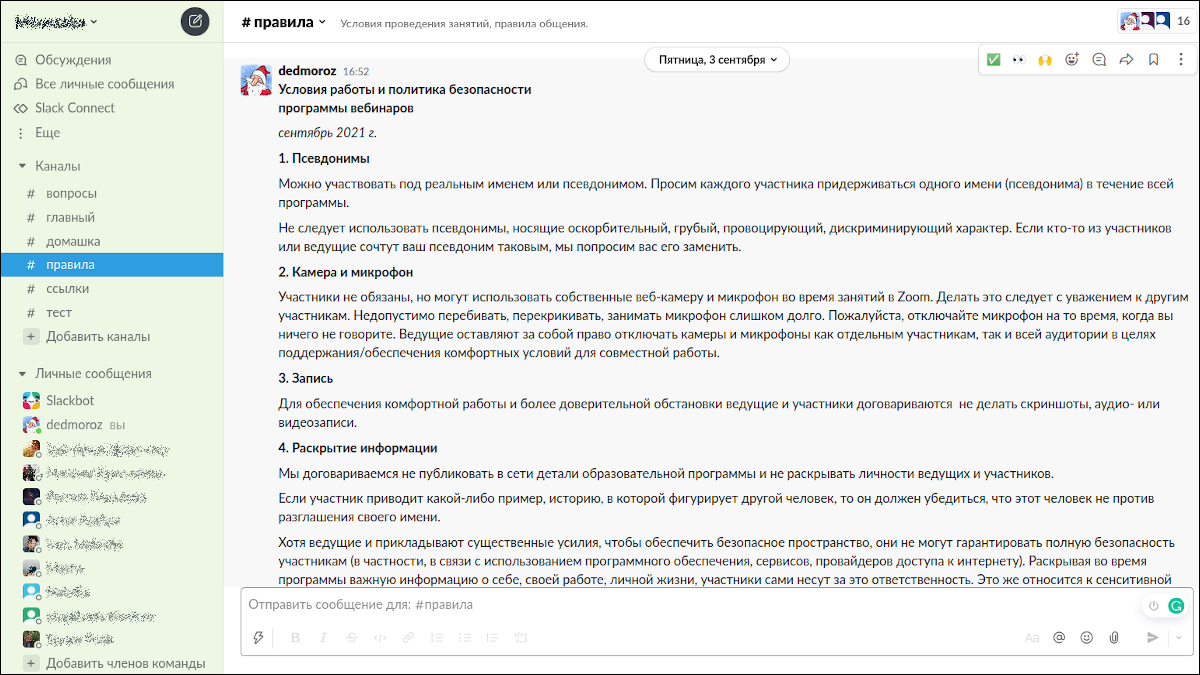
- "Rules". Here I post in advance what is called “Code of CondUCT” - the conditions for conducting classes. This includes the rules of safe space, anti -wasolation, non -violent and non -invasive communication, agreement not to record.
- "Links". Each lesson is accompanied by a list of “Reading Materials”. Or viewing, if this is a video, or listening, if podcast.
- "House". In this channel, I formulate homework and make decisions.
- "Questions". Here, the participants ask me questions that, for one reason or another, remained not asked (or not answered) directly during webinars.
- "Test". As the name is clear, this is a channel for those who see Slack for the first time and want to practice a little.
When creating the channel, mark the option so that everyone you invite to Slack will automatically sign on this channel. Add a short description to the channel name. This will help people navigate the appointment of channels.
Connection of participants
Find out what method of communication already unites your future participants. In my practice, this is usually either e -mail or a chat in Telegram. Use this communication method to inform people: you will soon invite them by email to Slack. Explain that Slack is a new workplace, and it is necessary for your classes. Ask people to go there and take a look at how everything works. Leave your contact details in case of problems.
Slack has an invitation template. Make corrections to it “to taste”. Use the email addresses of the participants and the standard Slack mechanism to send invitations by email. In the Slack settings you can observe who has already accepted your invitations (pressed the link in the letter and entered the workspace).
It is important to stay in touch with the participants. Usually the connection to Slack is technically simple. But there are purely human problems. During the period of pandemia, people are accustomed to the fact that webinars are Zoom and “talking heads”. And you have slides, games, polls, voting, Quiz , Miro , Kahoot , right? And now Slack. Attempts to introduce something new sometimes cause discontent and resistance. This is natural. You will need tact, patience and perseverance.
Work in Slack
At the beginning of the training, the host gives introductory information and talks about Slack. I accompany this story with slides: a common screenshot Slack and a screenshot of an invitation letter. If the participant belongs to the category of people who are postponing at the last moment, the screenshot of the letter will help to find your invitation in his mailbox.

In the next step, I show my browser screen with the working space and talk about each channel.
The general channel is used for brainstorms, exercises, energy razers. One of my loved ones is the “question of the day”. At the very beginning of the next lesson, the host offers the participants to answer one question. For example: “What do you know how to do well, except for your work?” Thus, people recognize each other better. Mini-dialogues are tied, jokes sound, the situation becomes less formal.
Two to three hours before the start of the lesson, I publish an actualized list of hyperlinks in the link channel. This allows the most curious to better understand what the lesson will be about.
Participants send the solved tasks to the Domashka channel. For example, I individually encrypt the material for each participant and send him/her in a personal message Slack. The participants publish deciphered results in the "Homemade".
The "Questions" channel is never empty. Some people are embarrassed to speak publicly during a Zoom session. Someone does not work as a microphone, and it is inconvenient to type text during the lesson. Sometimes the question comes to the head before or after the meeting. Often I myself ask people to transfer the question “from the air” to this channel. For example, if the issue requires additional research or goes beyond the program. There are also questions that are highly specialized in nature, interesting to few.
It is important that participants can work in Slack in parallel. There is no need to wait for the line or a certain “clerk” will fix the idea during the brainstorming.
How safe it is
Slack is a proprietary product without open code. It probably makes sense to trust him as much as you trust the developer, Slack Technologies, and the owner, Salesforce. The same question can be asked by the organizers of events on the Zoom platform. As a web service, Slack naturally supports HTTPS. Data is encrypted both in the process of transmitting on/s Slack servers, and in storage on servers. However, the through encryption is not discussed.
Slack does not require indicating a mobile phone number. It is not necessary to identify yourself in detail. In the settings, you can enable two -factor authentication. The owner of the working space can make it mandatory for all participants.
If your event implies the exchange of especially important, sensitive data, it is possible to reconsider the approach and not do it. Or choose an alternative to open code as a platform and, possibly, positive security audits.
I believe that Slack’s safety, first of all, is threatened not by evil hackers from the outside, but by the “internal” human factor. For example, if a provocateur or just a person who does not know how to behave in society gets into the workspace. He will not be able to create new channels, but is able to spoil the mood of the participants.
What we win
Let's summarize what benefit Slack is capable of. Here are just some advantages.
- All webinar materials are available without loss and expectations.
- Searching objects in the channels is easier than in one heap.
- We save time due to parallel work.
- We involve participants who are difficult to do in a voice during sessions.
- Participants can ask all their questions.
- The expert has more opportunities for a calm, thoughtful answer to them.
- You can edit the already published (for example, fix the error in the hyperlink).
- You can work with file files (for example, in homework).